What Is DKIM and SPF? Boost Email Deliverability 2026
Learn what is DKIM and SPF, how they work with DMARC, & their critical role in email deliverability. A guide for developers & AI builders.

John Joubert
Founder, Robotomail

Table of contents
Your agent sent the email. The workflow advanced. The CRM updated. The follow-up logic triggered.
Then nothing happened.
No reply. No delivery event you can trust. Maybe the message hit spam. Maybe the recipient server rejected it during SMTP. Maybe it passed one mailbox provider and disappeared at another. For AI agent developers, such scenarios mean email stops being a simple transport layer and becomes part of system reliability.
A lot of “what is DKIM and SPF” content explains the acronyms but misses the operational point. If your agent can't establish trust, the rest of your automation stack doesn't matter. An autonomous system that sends unauthenticated email is like a service trying to call a private API without credentials. It may work in a dev-like edge case. It won't hold up in production.
Your Agent's Email Just Vanished Why Trust Is Everything
Your agent sends a renewal notice at 2:07 AM. The app records success. The downstream workflow marks the task complete. By morning, the customer still has not seen the message, and your system has no trustworthy signal telling you whether it was delivered, spam-foldered, or rejected during SMTP.
That failure mode is common in agent-driven systems because email often sits between multiple hops, vendors, and transformations. A support agent may generate mail through one provider, route replies through another, and trigger follow-up actions from a third system. If the domain does not establish trust clearly, mailbox providers treat the message like possible impersonation, not like a legitimate application event.
Google's sender requirements now expect bulk senders to authenticate mail with SPF and DKIM, and Yahoo published similar requirements for high-volume senders in 2024 (Google Email Sender Guidelines, Yahoo sender requirements). Separately, MxToolbox reported that many domains still publish broken or incomplete authentication records, which is one reason deliverability problems remain so common in production (MxToolbox on SPF, DKIM, and DMARC checks). Good sending infrastructure also depends on operational hygiene beyond DNS, including the domain and IP practices covered in Stamina's email deliverability tips.
The engineering takeaway is straightforward. Mailbox providers do not care that your agent had good intent or that your app wrote "sent" to a log table. They evaluate whether the sending path is authorized and whether the message still looks like the one your system originated.
For autonomous agents, that distinction matters more than it does in a simple newsletter stack. Agents trigger passwordless login links, approval requests, billing notices, research summaries, and human handoff emails. Those messages get forwarded, rewritten, quoted, and parsed by other systems. Trust failures at that layer create real system bugs, not just marketing annoyances.
Treat SPF and DKIM the same way you treat TLS certificates, signed webhooks, and service-to-service auth. They belong in the first deployment pass.
SPF and DKIM cover different failure modes. SPF answers whether the sending infrastructure is allowed to use your domain. DKIM answers whether the message content still matches what your system signed before it crossed relays, gateways, or forwarding rules.
SPF The Digital Return Address
SPF is the first authorization check many mail systems make, and it answers a narrow question: was this server allowed to send mail for the envelope sender domain? For agent-driven systems, that matters because outbound mail rarely comes from one place. A single product may send through Google Workspace, a transactional provider, a support platform, and internal relays triggered by workflows.
You publish that authorization in DNS as a TXT record on the sending domain. The record tells receiving servers which IPs or services are permitted to send mail that uses your domain in the Return-Path.

What an SPF record is actually doing
An SPF record starts with v=spf1 and then lists the senders you trust. In practice, that usually means a mix of direct IP ranges, provider includes, and a final rule that says what to do with anything that does not match.
A typical policy includes:
- Specific hosts or networks through
ip4:orip6: - External mail services through
include: - A catch-all decision such as
~allor-all
Verification is simple on paper:
- The receiver reads the envelope sender domain.
- It fetches the SPF TXT record for that domain.
- It compares the connecting server to the allowed senders in the record.
- It stores the result as pass, fail, softfail, or neutral in authentication results.
The hard part is keeping that policy accurate as your system changes.
Where SPF breaks in real systems
SPF has a strict processing limit. The RFC caps SPF evaluation at ten DNS-querying mechanisms and modifiers, which is why records with stacked include: chains fail in ways that are annoying to debug (RFC 7208). I see this happen after teams add one more sender for support, one more sender for billing, then another for agent-generated outreach. The record still looks tidy in DNS. The receiving side sees a policy that is too expensive to evaluate.
That failure mode hits autonomous systems early. Agents often send on behalf of several tools, and they also trigger mail from different contexts: human notifications, approvals, summaries, fallback alerts, and handoff threads. If every workflow gets its own provider, SPF turns into a dependency graph hidden inside one TXT record.
Forwarding is the other major weakness. SPF validates the path the message took, not the message content. If a user forwards mail from one inbox to another, or a routing layer rewrites the return path, the forwarded copy can fail SPF even though the original sender was legitimate. For AI agents, that is not an edge case. Messages are commonly relayed through aliases, ticketing systems, shared inboxes, and security gateways before a human sees them or another system parses them.
A common mitigation is SPF flattening. It reduces nested includes into a shorter list of sending IPs so evaluation stays within protocol limits. That can make records easier to operate, but it adds maintenance overhead because provider IP ranges change. Flattening also does nothing for forwarding, which is why SPF alone is a poor fit for workflows where messages are routinely redirected or transformed.
For broader deliverability hygiene around infrastructure choices, provider mix, and domain setup, Stamina's email deliverability tips are a useful companion read.
One practical rule helps: use SPF to authorize infrastructure, not to prove message integrity. If your agent workflows depend on forwarding, routing, or downstream processing, SPF is necessary but incomplete.
A quick visual walk-through helps if you're explaining SPF to teammates:
DKIM The Tamper-Proof Content Seal
DKIM stands for DomainKeys Identified Mail. If SPF is the return address, DKIM is the tamper-proof seal on the letter itself.
The sending system creates a cryptographic signature using a private key. That signature is attached to the message headers. The recipient server then looks up the matching public key in DNS and verifies that the signed parts of the message still match.

What DKIM signs and how verification works
DKIM operates by signing specific email headers, such as From, Date, and Subject, plus body hashes using a private key. The receiver verifies this signature with a public key from DNS, ensuring the message is unaltered. Unlike SPF, this is path-independent, making it resilient to forwarding (Red Sift's DKIM, SPF, and DMARC guide).
The practical flow is:
- Your sending server generates a signature from selected headers and the body hash.
- It inserts that signature into the
DKIM-Signatureheader. - The receiving server reads the selector and domain from that header.
- It fetches the public key from DNS.
- It verifies the signature against the message it received.
If the message changed in a signed portion, verification fails.
Why developers should care
Generic “what is DKIM and SPF” articles often stop too early. For developers, DKIM isn't just anti-spoofing. It's a way to preserve message integrity across a chain of systems.
That matters when agents:
- Route through gateways that rewrite Return-Path values
- Send into alias systems that forward mail before it reaches the final inbox
- Trigger downstream actions where the recipient needs confidence that the content wasn't altered in transit
SPF can tell a receiver which server was allowed to send. DKIM can tell the receiver whether the content still matches what your infrastructure originally signed. Those are different guarantees.
A clean DKIM pass is often the difference between “this came from infrastructure I recognize” and “this is the same message the sender originally authored.”
There is a trade-off. Because DKIM signs content, downstream modifications can invalidate the signature. Mailing list footers, aggressive gateway rewriting, or body transformations can break it. In practice, that means you should be deliberate about where in your pipeline signing occurs. Sign as late as possible, after the message body and key headers are finalized.
For AI agents, that advice matters even more. If your workflow rewrites content after signing, you've invalidated your own proof.
SPF vs DKIM and The Role of DMARC
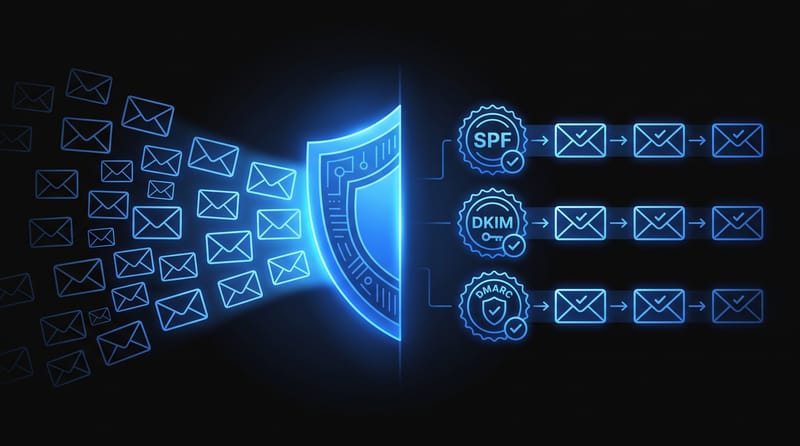
SPF and DKIM are complementary, not competing. One authenticates the route. The other authenticates the message.
SPF vs DKIM at a glance
| Aspect | SPF (Sender Policy Framework) | DKIM (DomainKeys Identified Mail) |
|---|---|---|
| What it verifies | The sending server is authorized | The signed message content is intact |
| Where it lives | DNS TXT record for sender policy | DNS TXT record containing the public key |
| What the receiver checks | Envelope sender domain and sending path | Signature in the message header against DNS key |
| Main strength | Good at declaring approved senders | Good at preserving trust across forwarding |
| Main weakness | Breaks on many forwarding scenarios | Fails if signed content is modified after signing |
| Best use | Controlling which systems may send | Proving integrity of what was sent |
A concise way to frame the difference is this: SPF validates the sending IP against an authorized list, while DKIM validates message integrity independent of the transmission path, which makes DKIM more resilient when forwarding changes the sender path (IRONSCALES comparison of SPF, DKIM, and DMARC).
DMARC is the policy layer
DMARC sits on top of SPF and DKIM. It tells receiving servers what to do when authentication fails, and it checks alignment between the visible From domain and the domain validated by SPF or DKIM.
Without DMARC, you can have technically passing auth checks that still don't protect the visible identity users see. That's the loophole DMARC closes.
In practice, DMARC gives you three things:
- Policy control so receivers know whether to monitor, quarantine, or reject failing messages
- Domain alignment so the visible sender matches the domain being authenticated
- Reporting visibility so you can understand where mail is passing or failing
Why this matters for agent workflows
Autonomous systems often mix senders and domains. One component sends notifications, another handles support replies, another sends summaries through a third-party provider. That's where alignment mistakes show up. The message may technically originate from valid infrastructure, but if the visible From domain doesn't align with the authenticated domain, DMARC can still fail.
This is why email auth has to be designed at the domain level, not bolted onto a single sending service.
If you need a deeper operational refresher on records, routing, and email-related DNS behavior, Robotomail's guide to DNS for email is a practical reference.
How to Set Up and Verify Your Records
The mechanics aren't hard, but they are unforgiving. Most auth failures come from bad composition, duplicate records, or letting multiple vendors modify DNS independently.
Start with a simple SPF policy
Keep your SPF policy consolidated. You should have one SPF TXT record for a domain, not one per vendor. If several providers need to send on your behalf, their mechanisms must be merged into a single record.
What tends to work:
- One owner for the record. One team or system should own SPF changes so vendors don't create conflicting entries.
- A provider inventory. List every platform that sends mail for the domain. Remove old services.
- A lookup budget. Before adding another
include:, count what it expands into.
What doesn't work is appending sender after sender over time and hoping DNS stays coherent. It won't.
Publish DKIM where the sender expects it
DKIM usually requires a selector-specific DNS record published at a subdomain under _domainkey. Your sending provider or mail platform typically gives you the exact host and value to publish.
The common mistakes are operational, not conceptual:
- Wrong selector. The message references one selector, but DNS has another.
- Stale key rotation. The sender has changed keys, but DNS hasn't caught up.
- Formatting issues. Copy and paste problems break long TXT values.
Because DKIM signs the final message, keep the signing point close to final delivery. If an upstream app signs and a downstream system rewrites the body, you'll see failures that look random until you inspect the auth results.
Field note: When SPF and DKIM both fail, don't start with content. Start with DNS, selectors, and the actual sending path.
Verify before you trust your logs
Application logs only tell you that your code handed a message off. They do not tell you what a receiver concluded.
Use external verification tools after every DNS change. Two common choices are MXToolbox and Dmarcian. The goal isn't just “record found.” You want confirmation that:
- SPF is syntactically valid
- There is only one effective SPF policy
- DKIM public keys are published at the expected selector
- DMARC exists and aligns with your sending model
When reading results, pay attention to warnings that seem minor. A record can exist and still be operationally weak.
Check the message headers on real deliveries
The most useful test is sending a message to a mailbox you control and reading the authentication results in the headers. Look for fields that show SPF, DKIM, and DMARC outcomes.
This tells you:
- whether the receiver found the records you thought you published
- whether the message was signed by the domain you expected
- whether forwarding or relaying changed the path enough to break SPF
- whether alignment matched the visible From address
If you're using a platform that handles auth setup programmatically, the implementation details depend on the provider. Robotomail's authentication documentation covers how its domain authentication flow works.
The discipline that pays off is boring: change one thing, verify externally, send a real message, inspect headers, and only then move on.
The Agent-Native Approach with Robotomail
An agent sends a passwordless login link, a vendor outreach email, or a status alert. The application marks it as sent. Hours later, nothing happened because the message failed authentication after a forward, a rewrite, or a provider mismatch that nobody modeled up front.
Manual DNS work can support a small setup with one domain and one sending path. It becomes fragile when mailboxes are created and retired by code, different agents send through different services, and forwarding is part of the product instead of an edge case.

The scaling problem is operational
The challenge is not learning the definitions of SPF and DKIM. The challenge is keeping authentication correct as the system changes.
Agent platforms create failure modes that generic email guides barely mention. One workflow sends from your app. Another forwards inbound mail to an agent runner. A third rewrites content before handing it to a human. SPF can break on forwarding. DKIM can fail after message modification. DMARC alignment can fail even though each individual record exists in DNS. That combination shows up often in autonomous systems because messages pass through more hops and more software than a typical SaaS notification pipeline.
Teams usually feel this as ownership drift. Someone adds a new sender. Someone rotates a DKIM selector. Someone copies an SPF include from another tool and pushes the domain over lookup limits. The result is not a clean outage. It is partial trust failure that only affects certain flows, which makes it harder to detect and harder to debug.
What changes with an agent-native stack
The useful pattern is to treat email authentication the same way you treat webhooks, queues, and bot defenses. It belongs in infrastructure, not in a spreadsheet of DNS edits.
Robotomail fits that model in a practical way. It provides email infrastructure for AI agents, lets developers create a real mailbox through an API, supports send and receive flows, and supports custom domains with auto-configured DKIM, SPF, and DMARC. For a team shipping autonomous workflows, that shifts work away from mailbox-by-mailbox setup and toward repeatable provisioning.
In practice, that means:
- less manual DNS coordination as agent mailboxes and sending contexts change
- fewer authentication mistakes from copying values across providers and dashboards
- clearer separation of concerns between agent behavior and email transport
- better odds of surviving real-world mail paths that include forwarding, relays, and content transformation
The trade-off is straightforward. Managed infrastructure reduces repetitive setup and lowers the chance of configuration drift, but it does not remove the need to understand how mail trust works. Teams still need to know which domain signs mail, which domain appears in From, what forwarding does to SPF, and why adjacent controls such as anti-bot services matter when agents operate on the public internet.
That is the agent-native approach. Keep the protocol knowledge. Stop rebuilding the plumbing for every new autonomous workflow.
Building Trustworthy Autonomous Systems
If you're still asking what is DKIM and SPF in practical terms, here's the short version. SPF tells receivers which systems may send for your domain. DKIM proves the message still matches what your system signed. DMARC ties those checks to the visible sender identity and tells receivers how to handle failures.
That combination is what turns email from “message sent” into “message trusted.”
For agent builders, this belongs in the same category as rate limits, signed webhooks, and bot controls. You harden every boundary where automation meets the outside world. That's also why teams working on broader abuse resistance often review adjacent infrastructure such as anti-bot services, because communication trust and system trust usually fail together.
Reliable autonomous email starts with authentication. Without it, your agents can talk. They just won't be believed.
If you're building agents that need real mailboxes, authenticated sending, and programmable inbound handling, Robotomail is worth evaluating. It's built for API-first agent workflows and supports custom domains with DKIM, SPF, and DMARC so your team can spend less time wiring email infrastructure and more time on agent behavior.
Give your AI agent a real email address
One API call creates a mailbox with full send and receive. Webhooks for inbound, automatic threading, deliverability handled. 30-day money-back guarantee.
Related posts
Email Security Protocols: Stop Phishing & Spoofing 2026
Discover how email security protocols (SPF, DKIM, DMARC) combat phishing and spoofing. This 2026 developer's guide covers implementation and monitoring.
Read post
How to Configure DKIM: A Developer's Step-by-Step Guide
Learn how to configure DKIM to improve email deliverability. Our guide covers key generation, DNS records, verification, and troubleshooting common issues.
Read post
Fix DMARC Record Not Found Errors: 2026 Guide
Fix a DMARC record not found error. Our 2026 guide covers DNS checks, TXT record syntax, and common pitfalls to boost email deliverability.
Read post