Email Security Protocols: Stop Phishing & Spoofing 2026
Discover how email security protocols (SPF, DKIM, DMARC) combat phishing and spoofing. This 2026 developer's guide covers implementation and monitoring.

John Joubert
Founder, Robotomail
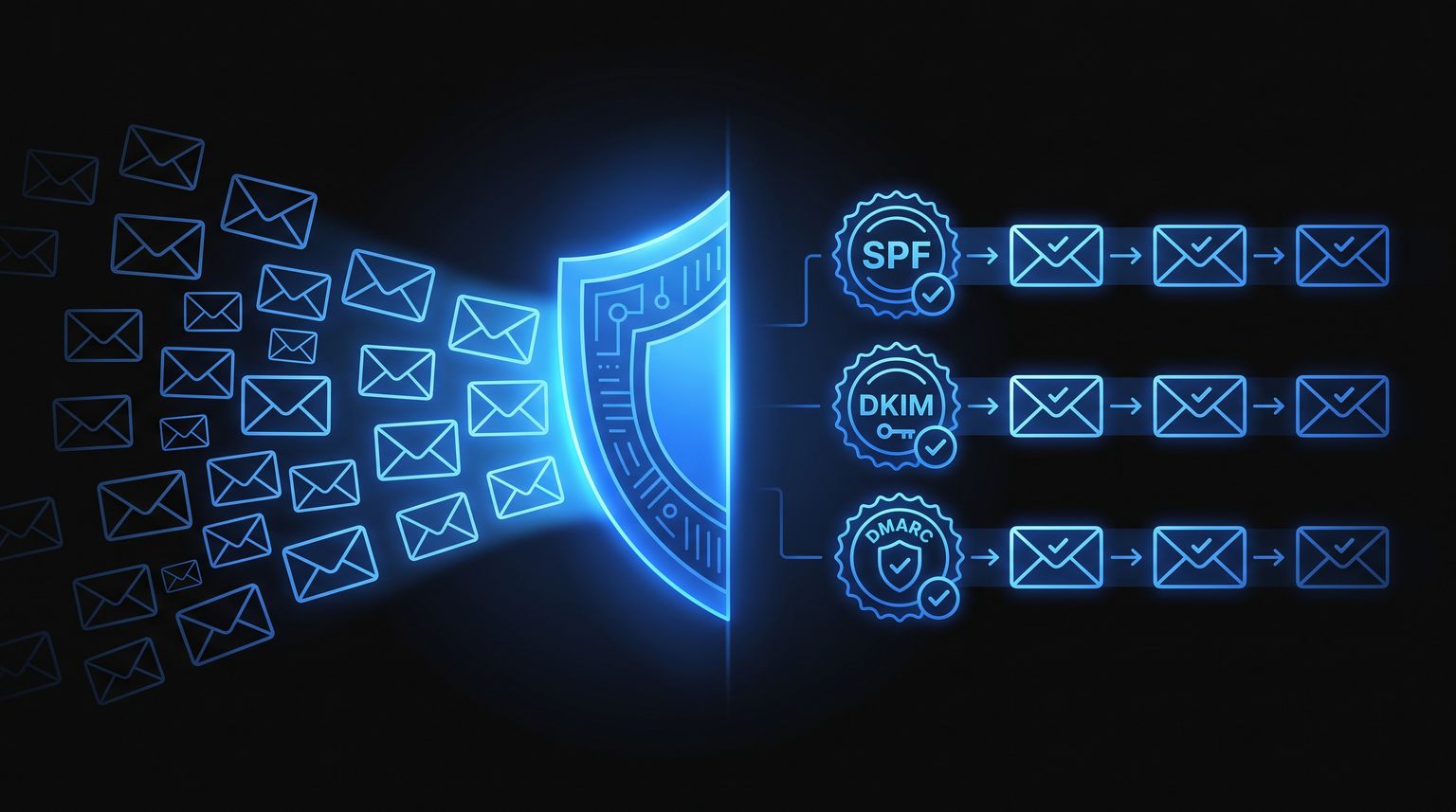
Table of contents
- Why Email Security Protocols Matter Now More Than Ever
- The Three Pillars of Email Authentication
- How These Protocols Mitigate Common Threats
- A Phased Approach to Deployment and Monitoring
- The Security Gap for Autonomous AI Agents
- Achieving Agent-Native Security with Robotomail
- Conclusion The Future of Email Security Is Automated
3.4 billion spam emails are sent every single day, and phishing remains the most common form of cybercrime according to EasyDMARC's overview of modern email protections. That number changes how you should think about email. The default question isn't “Will someone try to spoof our domain?” It's “How many times a day will receiving systems need to decide whether a message claiming to be from us is real?”
That's why email security protocols matter far beyond compliance checklists. They define whether inbox providers can trust mail from your domain at all. For developers and infrastructure teams, this is less about marketing deliverability and more about establishing a machine-verifiable identity layer for a protocol that was never designed with strong sender authentication built in.
The standard guidance usually stops at human users, mailbox security, and phishing awareness. That misses a newer problem. Autonomous systems now send, receive, and act on email too. If an AI agent can trigger workflows from inbound mail or send customer-facing messages on your behalf, weak authentication turns into a systems problem, not just a user training problem.
Why Email Security Protocols Matter Now More Than Ever
Attackers do not need to break SMTP. They can abuse the trust assumptions it still carries.
Email was designed to move messages between servers, not to prove that the domain shown in the From header authorized the send. That gap used to be a nuisance mostly discussed in terms of spam and user awareness. Now it affects delivery, domain reputation, automated workflows, and any system that treats email as a trigger for downstream actions.
Mailbox providers have also raised the floor. Google and Yahoo now expect bulk senders to authenticate mail properly, and many teams are learning the hard way that authentication problems show up as both security incidents and delivery failures, as described in these insights into email security.
Why filters alone fail
Spam filtering works on probability. Email authentication works on proof.
Filters inspect content, reputation, and sending behavior, then make a risk decision. That helps, but it does not answer the core identity question. Did this domain authorize the sender, and did the message arrive without unauthorized modification? A spoofed invoice, password reset, or workflow notification can look perfectly legitimate to a content filter if the wording is clean and the infrastructure has not yet been burned.
That distinction matters even more in automated environments. A human might hesitate before clicking a suspicious message. An AI agent that ingests inbound mail, extracts intent, and triggers a workflow will act on whatever reaches it unless the identity layer is enforced first.
Practical rule: Treat filtering as detection and authentication as sender identity control. Both belong in the stack, but they solve different problems.
What changed operationally
Email authentication now belongs in the same category as TLS, signed webhooks, and workload identity. It is baseline infrastructure.
For engineering teams, that changes the job from "set a DNS record once" to "maintain a verifiable sending model across every system that can send on behalf of the domain." Transactional providers, support platforms, marketing tools, product notifications, and internal automation all need to line up. If one service is misconfigured, the domain pays for it.
The same applies to agent-based systems. If an autonomous agent can send customer email, open tickets from inbound messages, or execute actions from mail content, weak authentication is not just a phishing risk. It is a control-plane risk. The message becomes an API call with a very old transport underneath.
The mechanics are straightforward, even if the rollout is not. SPF and DKIM each verify a different part of sender legitimacy, and DMARC adds policy plus reporting so receivers know what to do when checks fail. Together they give receiving systems a machine-readable basis for trust, which is exactly what human operators and autonomous agents both need.
The Three Pillars of Email Authentication
Email authentication makes more sense when you stop treating the acronyms like vendor jargon and map them to familiar control patterns.
SPF is a guest list. DKIM is a tamper-evident seal. DMARC is the policy enforcer at the door.

SPF as the guest list
SPF (Sender Policy Framework) lets a domain publish which sending infrastructure is allowed to send mail on its behalf. When a receiving server sees a message claiming to come from your domain, it checks whether the sending server appears on that published list.
That's the simple mental model. If the sender isn't on the guest list, the message shouldn't be trusted.
In practice, SPF is useful but limited. It validates sending path, not message content. It also gets fragile when organizations add many third-party senders over time. Marketing platforms, support systems, CRMs, and transactional providers can turn one clean SPF record into something hard to reason about.
DKIM as the tamper-proof seal
DKIM (DomainKeys Identified Mail) is the stronger cryptographic control in the trio. DKIM employs public key cryptography to sign emails. The sending server uses a private key to create a signature, and the recipient's server validates it using the public key from the sender's DNS records, confirming the message hasn't been altered, as explained by Cyber Centre guidance on email security best practices.
That makes DKIM more like a wax seal than a sender allowlist. If someone modifies the protected parts of the message in transit, the signature check fails. If an attacker tries to inject mail that pretends to be from your domain without access to the signing key, they can't produce a valid signature.
For teams that want a practical refresher on how the records fit together, Robotomail's explanation of what DKIM and SPF do in practice is a useful implementation-oriented reference.
DKIM is the part developers usually trust most once they understand it, because it behaves like every other signature verification problem they already know.
DMARC as the policy layer
DMARC doesn't replace SPF or DKIM. It coordinates them. It tells receiving servers what your domain wants them to do when authentication fails, and it creates a reporting loop so you can see who is sending as your domain.
Without DMARC, SPF and DKIM are just signals. With DMARC, they become enforceable policy.
This is also where operational maturity shows up. A domain can have SPF and DKIM configured and still leave spoofing exposure on the table if DMARC is absent or too permissive.
SPF vs. DKIM vs. DMARC at a glance
| Protocol | Primary Function | Analogy | Verifies... |
|---|---|---|---|
| SPF | Authorizes sending infrastructure | Guest list | Whether the sending server is allowed to send for the domain |
| DKIM | Cryptographically signs messages | Tamper-proof seal | Whether the message is intact and signed by the domain |
| DMARC | Defines handling for auth failures | Bouncer with instructions | Whether receivers should monitor, quarantine, or reject unauthenticated mail |
A useful way to think about the stack is that SPF checks route legitimacy, DKIM checks message integrity, and DMARC turns both into an actionable trust policy.
If your goal is not only to secure mail but also to improve email deliverability, that same alignment matters. Deliverability and domain trust are often the same engineering problem viewed from different teams.
How These Protocols Mitigate Common Threats
Attackers don't care whether your configuration looks tidy in a dashboard. They care whether they can impersonate your domain, alter a message in transit, or get a fraudulent email accepted long enough to trigger a workflow.
The threat is severe: 97% of organizations have been targeted by phishing attacks, and two out of three companies have been harmed by ransomware attacks, which are often delivered via email, according to Mailmend's compiled email authentication statistics.

Domain spoofing and impersonation
The simplest email fraud is direct impersonation. An attacker sends a message that appears to come from your company, often targeting customers, vendors, or internal finance staff.
SPF helps by rejecting mail sent from infrastructure you never authorized. DMARC matters even more here because it tells receiving systems to act on the failed check rather than merely note it.
Typical examples include:
- Executive impersonation: A fake request that appears to come from a founder, CFO, or department lead.
- Brand phishing: Messages that mimic your support, billing, or account team.
- Third-party abuse: Fraud sent to customers from lookalike infrastructure using your visible domain.
Message tampering in transit
DKIM proves its worth. If a legitimate message is modified after the sender signs it, the recipient's validation step can detect that the content no longer matches the original signature.
That matters for more than classic spoofing. It protects workflow assumptions. If a downstream automation consumes inbound email, a broken DKIM chain is a useful signal that the message may not be trustworthy.
A practical walkthrough of DMARC reporting helps a lot once you start tracing these cases. Robotomail's guide on how to read DMARC reports is a good example of the sort of operational view teams need.
The biggest mistake teams make is treating SPF, DKIM, and DMARC as mailbox settings. They're boundary controls for every system that sends or acts on email under your domain.
A short explainer can also help when you need to align engineering, security, and operations around the same mental model:
A Phased Approach to Deployment and Monitoring
The right rollout strategy is boring on purpose. Email authentication breaks production when teams flip enforcement before they've discovered every legitimate sender using the domain.
That's why mature deployment starts with inventory and observation, not rejection.

Start with an audit
List every system that sends email for the domain. That usually includes more than engineering expects. Product mail, support tools, billing platforms, CRM campaigns, recruiting systems, status updates, and internal automation often all send under the same brand domain.
Then separate them into categories:
- Core transactional senders: Application mail, password resets, receipts.
- Business systems: CRM, ticketing, support, finance, recruiting.
- Shadow senders: Old vendors, forgotten integrations, test environments.
Shadow senders are where rollouts usually go wrong. They don't show up in architecture diagrams, but they absolutely show up in DMARC data once monitoring begins.
Publish and validate in stages
A good order of operations looks like this:
- Set up SPF carefully: Keep the list of authorized senders accurate and minimal.
- Enable DKIM on every legitimate sending platform: Signing should be consistent across your mail sources.
- Deploy DMARC in monitoring mode: Start with
p=noneso you can observe failures without breaking good mail. - Review reports and close gaps: Fix unknown senders, alignment issues, and vendor misconfigurations.
- Tighten policy gradually: Move to quarantine, then reject once the failure stream is understood.
Field note: If you can't explain every major source in your DMARC reporting, you aren't ready for hard enforcement.
Move toward reject with confidence
Major providers now recommend p=reject for maximum protection, ensuring mail that fails SPF or DKIM checks is rejected by the receiving server, as noted in Insight's summary of current email security expectations.
That doesn't mean you should jump there immediately. It means reject is the destination, not the starting point.
Common failure patterns during rollout include:
- Too many SPF dependencies: SPF has a DNS lookup limit, so sprawling include chains can become a reliability problem.
- Partial vendor coverage: One platform signs with DKIM correctly while another still sends unsigned mail.
- Organizational drift: New tools get added without updating email authentication.
- Alignment confusion: A system may technically send successfully while still failing DMARC policy expectations.
Treat monitoring as an ongoing control
This isn't a one-time DNS project. Teams add services, retire vendors, and ship new automations constantly. Email security protocols need the same change discipline as certificates, secrets, and IAM rules.
The healthiest operating model is simple. New service wants to send mail. It doesn't go live until SPF, DKIM, and DMARC implications are reviewed.
The Security Gap for Autonomous AI Agents
Most guidance around email security assumes a human sits at the center of the workflow. A user signs in, grants consent, reviews a suspicious message, or notices something odd in the UI. That model falls apart when software agents handle email end to end.
Existing security guides focus on human-centric workflows, but with AI agents projected to drive 35% of enterprise email traffic by 2025, organizations lack protocols for agent-native security, risking spoofing when agents bypass traditional OAuth flows, according to Darktrace's discussion of email protocols and cyber AI.
Why human-first controls don't map cleanly
OAuth consent screens, mailbox delegation, and manual provisioning are fine when a person owns the mailbox. They're awkward for an autonomous agent. In many cases, they're the wrong abstraction entirely.
An agent needs programmatic guarantees:
- It must send authenticated mail by default
- It must verify inbound authenticity before acting
- It must preserve conversation context without weakening trust boundaries
- It must avoid hidden manual steps that block unattended operation
That's not just a usability issue. It's a security design issue.
What breaks in practice
If an agent sends from a weakly authenticated setup, providers may distrust the message, recipients may never see it, and operations teams lose visibility into whether the failure was reputation, policy, or routing.
The inbound side is more dangerous. If an agent consumes spoofed or tampered email as trusted input, it can trigger the wrong workflow with machine speed. A fake approval, fake ticket update, or fake customer response can become a real system action before any human notices.
Human review used to be the safety net. In agent workflows, the protocol layer has to do more of that work.
This is the underserved part of the problem. Traditional email security explains how to protect people from bad messages. Agent-native email security also has to explain how machines decide what not to trust.
Achieving Agent-Native Security with Robotomail
The cleanest answer to the agent problem is to stop adapting human mailbox tooling and use infrastructure built for autonomous send-and-receive workflows.
According to Robotomail's documentation, the platform provides auto-configured DKIM, SPF, and DMARC for custom domains, eliminating the manual DNS setup that often slows down or breaks email authentication in application workflows. It also presents email infrastructure through APIs rather than browser-centered mailbox administration, which is the right shape for autonomous systems.

That matters because secure automation needs more than outbound delivery. It needs verifiable inbound handling too. Robotomail states that developers can handle inbound through webhooks, server-sent events, or polling, with HMAC-signed delivery for integrity. That gives agent builders a direct way to verify that an inbound event came from the platform and wasn't altered in transit.
There's also a broader architectural point here. When custom-domain authentication is automatic and mailbox creation happens through an API, developers don't need to become part-time email administrators just to give an agent a legitimate communications channel.
For agent systems, that's the difference between “email support exists” and “email can be trusted as an autonomous interface.”
Conclusion The Future of Email Security Is Automated
Analysts and mailbox providers keep tightening enforcement because unauthenticated email still creates too much ambiguity for receiving systems. SPF, DKIM, and DMARC remain the foundation of trustworthy email because they replace guesswork with verifiable signals about who sent a message and whether it was altered.
What changed is the operating model around email. Email now sits inside application backends, support pipelines, transactional systems, and AI agent workflows that send, receive, and act on messages without waiting for a human to inspect every step.
That shift exposes a practical limit in the old setup. Manual DNS work, mailbox-by-mailbox administration, and fragmented vendor tooling can support low-volume human workflows, but they introduce failure points when autonomous systems need authenticated sending and verifiable inbound processing at scale.
Secure email should behave like infrastructure. Declarative, observable, and automated by default.
In practice, email security protocols are heading toward systems that apply policy correctly as part of provisioning, delivery, and monitoring. The goal is not more complexity for product teams. The goal is fewer chances to misconfigure a domain, publish a weak policy, or miss an inbound trust failure in an agent workflow.
For teams building AI agents, that distinction matters more than it does in traditional inbox setups. A human can spot a suspicious thread or pause before replying from the wrong mailbox. An autonomous agent needs those trust boundaries built into the platform, because it will act on what it receives.
If you're building AI agents that need real inboxes, secure outbound delivery, and trustworthy inbound handling, Robotomail is worth a close look. It's purpose-built for agent-native email workflows, with API-based mailbox creation, HMAC-signed inbound events, and automatic SPF, DKIM, and DMARC support for custom domains so your team can ship autonomous email features without wrestling with manual mailbox provisioning.
Give your AI agent a real email address
One API call creates a mailbox with full send and receive. Webhooks for inbound, automatic threading, deliverability handled. 30-day money-back guarantee.
Related posts
How to Configure DKIM: A Developer's Step-by-Step Guide
Learn how to configure DKIM to improve email deliverability. Our guide covers key generation, DNS records, verification, and troubleshooting common issues.
Read post
What Is DKIM and SPF? Boost Email Deliverability 2026
Learn what is DKIM and SPF, how they work with DMARC, & their critical role in email deliverability. A guide for developers & AI builders.
Read post
Fix DMARC Record Not Found Errors: 2026 Guide
Fix a DMARC record not found error. Our 2026 guide covers DNS checks, TXT record syntax, and common pitfalls to boost email deliverability.
Read post