Email Infrastructure for Multi-Agent Systems
How to architect email for systems with multiple AI agents: mailbox-per-agent, shared domains, threading across agents, security patterns, and scaling.

John Joubert
Founder, Robotomail
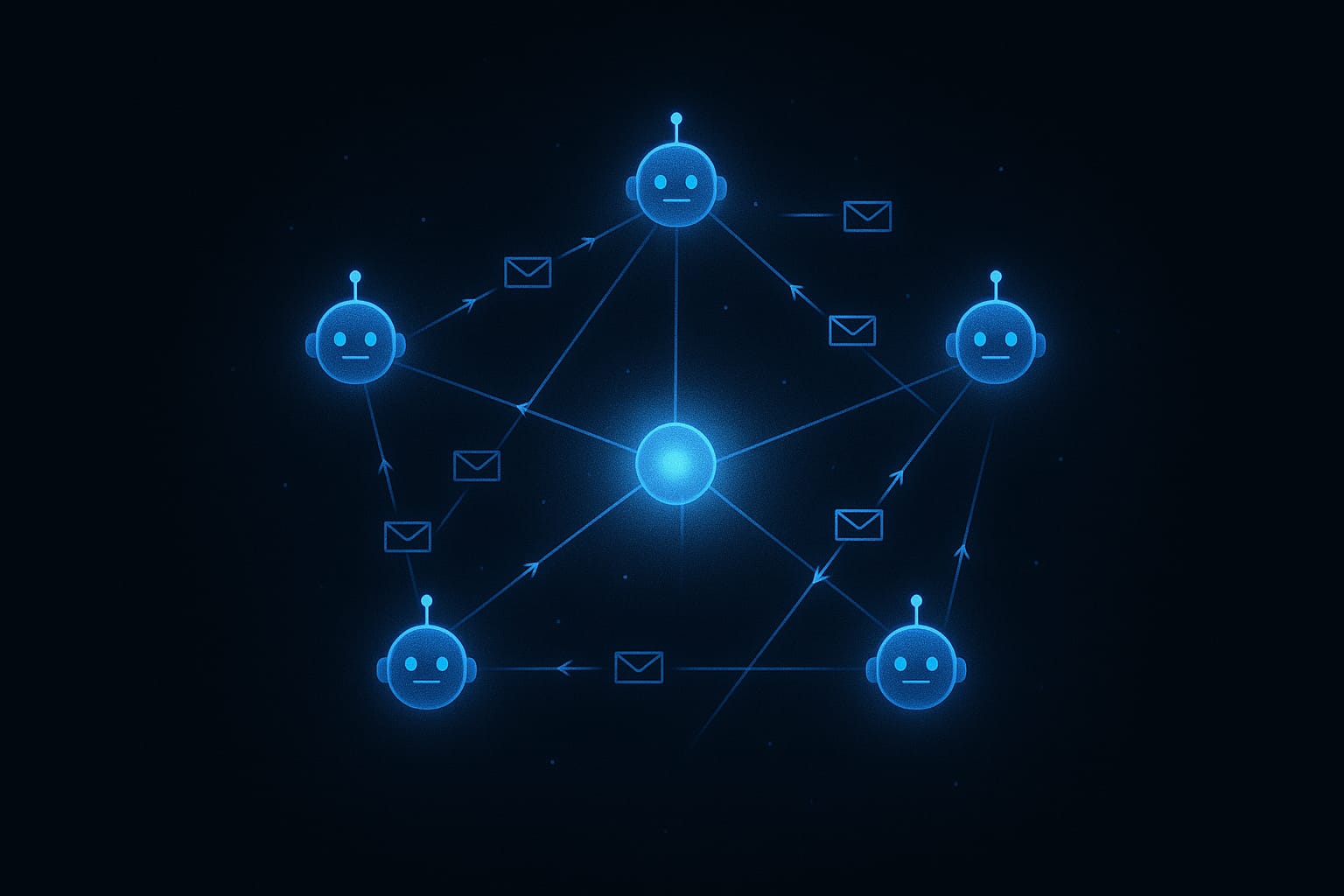
Table of contents
You've got one agent sending email. It has a mailbox, an API key, and it's happily firing off messages. Everything works. Then the scope changes: now you need ten agents. Or a hundred. Each with its own identity, its own conversations, its own rate limits. Suddenly the architecture decisions matter.
Multi-agent email isn't a theoretical exercise anymore. Teams are building systems where specialized agents handle different functions (customer support, billing inquiries, sales outreach, internal notifications) and each one needs to communicate over email like a real person. The question isn't whether to give agents email. It's how to architect it so the system stays coherent as it scales.
After building Robotomail and watching how teams deploy agent email in production, a few clear patterns have emerged. Here's how to think about each one.
Pattern 1: One mailbox per agent
The simplest architecture, and the one you should default to. Every agent in your system gets its own dedicated mailbox with its own email address. Agent A is support@robotomail.co, Agent B is billing@robotomail.co, and never the two shall cross.
The benefits are significant:
- Clear identity. Every message sent by an agent is traceable to exactly one mailbox. No ambiguity about who said what.
- Isolated threading. Each agent's conversations are self-contained. Agent A's support threads never collide with Agent B's billing threads.
- Independent rate limits. If one agent goes haywire and hits its daily send cap, the others keep running. Blast radius is contained.
- Clean audit trails. When something goes wrong (and it will), you can inspect a single mailbox's message history without filtering through noise from other agents.
With Robotomail, provisioning a mailbox is a single API call. Spinning up ten agents means ten calls:
const agents = ["support", "billing", "outreach", "onboarding", "alerts"];

const mailboxes = await Promise.all(
  agents.map((name) =>
    fetch("https://api.robotomail.com/v1/mailboxes", {
      method: "POST",
      headers: {
        Authorization: `Bearer ${API_KEY}`,
        "Content-Type": "application/json",
      },
      body: JSON.stringify({
        address: name,
        domainId: "550e8400-e29b-41d4-a716-446655440000",
        displayName: `${name.charAt(0).toUpperCase() + name.slice(1)} Agent`,
      }),
    }).then((r) => r.json())
  )
);

// Each agent now has its own address, its own threads, its own limits
This pattern scales linearly and predictably. It's also the easiest to reason about when debugging: you know exactly which agent owns which mailbox.
Pattern 2: Shared domain, unique addresses
A variation on the first pattern that adds brand consistency. All your agents live under one custom domain (support@acme.com, billing@acme.com, outreach@acme.com) so recipients see a unified company identity regardless of which agent is talking.
The key advantage here is operational simplicity at the DNS layer. You configure your domain once (MX records, SPF, DKIM, DMARC) and every mailbox under that domain inherits the authentication. No per-agent DNS work.
In Robotomail, this starts with adding a domain:
// 1. Add your domain. Robotomail returns the DNS records to configure
const domain = await fetch("https://api.robotomail.com/v1/domains", {
  method: "POST",
  headers: {
    Authorization: `Bearer ${API_KEY}`,
    "Content-Type": "application/json",
  },
  body: JSON.stringify({ domain: "acme.com" }),
}).then((r) => r.json());

// domain.dnsRecords contains MX, SPF, DKIM, and DMARC entries
// Configure these in your DNS provider, verification is automatic

// 2. Once verified, create mailboxes under the domain
await fetch("https://api.robotomail.com/v1/mailboxes", {
  method: "POST",
  headers: {
    Authorization: `Bearer ${API_KEY}`,
    "Content-Type": "application/json",
  },
  body: JSON.stringify({
    address: "support",
    domainId: domain.id,
    displayName: "Acme Support",
  }),
});
This is the right choice when your agents are customer-facing and you want recipients to interact with your brand, not with individual bot identities. It also simplifies deliverability management since domain-level reputation is shared.
Pattern 3: Agent pools with routing
This is the most advanced pattern and only makes sense at scale. A pool of stateless agents shares a set of mailboxes, and inbound email is routed to the right agent based on content, headers, or metadata.
Think of it like a load balancer for email. Ten agents share three mailboxes. Inbound messages hit a webhook endpoint, your routing logic inspects the payload, and the message gets dispatched to whichever agent should handle it.
// Capture the raw request body so the signature can be verified against it
app.post(
  "/webhooks/inbound",
  express.raw({ type: "application/json" }),
  (req, res) => {
    // Verify the HMAC-SHA256 signature over the raw request body
    const signature = req.headers["x-robotomail-signature"];
    const expected = crypto
      .createHmac("sha256", WEBHOOK_SECRET)
      .update(req.body) // req.body is the raw Buffer
      .digest("hex");

    if (signature !== expected) {
      return res.status(401).send("Invalid signature");
    }

    // Payload envelope: { event, timestamp, data }
    const payload = JSON.parse(req.body);
    const message = payload.data;
    const { subject, thread_id } = message;

    // Route based on content, thread history, or mailbox
    if (subject.toLowerCase().includes("invoice")) {
      billingAgent.handle(message);
    } else if (thread_id && activeThreads.has(thread_id)) {
      // Continue with the agent that started this thread
      activeThreads.get(thread_id).handle(message);
    } else {
      // Default to the support agent
      supportAgent.handle(message);
    }

    res.status(200).send("OK");
  }
);
This pattern is powerful but adds complexity. You need to manage routing state, handle edge cases (what if the original agent is down?), and ensure thread continuity. Use it when you have high-volume, stateless agents where the cost of one-mailbox-per-agent is prohibitive, or when you need to dynamically scale agents up and down without creating and destroying mailboxes.
Threading across agents
One of the trickiest problems in multi-agent email: what happens when Agent A starts a conversation and Agent B needs to continue it? Maybe the support agent escalated to the billing agent, or an agent went offline and a replacement picked up the thread.
Email threading relies on two headers: In-Reply-To (the Message-ID of the message being replied to) and References (the full chain of Message-IDs in the thread). If Agent B includes the correct headers when replying, the recipient's email client will thread the messages together, even though they came from different addresses.
// Agent B retrieves the thread context
const thread = await fetch(
  `https://api.robotomail.com/v1/mailboxes/${mailboxId}/threads/${threadId}`,
  { headers: { Authorization: `Bearer ${API_KEY}` } }
).then((r) => r.json());

// Reply in-thread. Robotomail automatically sets
// In-Reply-To and References headers
await fetch(`https://api.robotomail.com/v1/mailboxes/${mailboxId}/messages`, {
  method: "POST",
  headers: {
    Authorization: `Bearer ${API_KEY}`,
    "Content-Type": "application/json",
  },
  body: JSON.stringify({
    to: [thread.messages[0].from],
    subject: thread.subject,
    bodyText: "Following up on this thread with additional details...",
    inReplyTo: "<msg_abc123@robotomail.co>", // Message-ID of the message being replied to
  }),
});
Robotomail handles the header mechanics automatically. When you send a message with an inReplyTo Message-ID, it sets the correct In-Reply-To and References values. For inbound messages, it matches threads using these headers first, then falls back to normalized subject matching. The threading just works, even when different agents are participating in the same conversation.
Identity and trust
When humans send email, deliverability problems are annoying. When agents send email at scale, deliverability problems are existential. If your agent's emails land in spam, the entire system breaks.
Email authentication has three layers, and all three matter for multi-agent systems:
- DKIM cryptographically signs each message, proving it wasn't tampered with in transit. One key per domain, covers all mailboxes.
- SPF tells receiving servers which IPs are authorized to send for your domain. Prevents spoofing.
- DMARC ties DKIM and SPF together with a policy for what to do when authentication fails. The final layer of trust.
When you add a custom domain in Robotomail, all three are covered. Robotomail generates the exact DNS records to add, and once they're in place, verification runs automatically and every mailbox on that domain sends with full authentication. No per-agent configuration required. This is especially important in multi-agent setups where provisioning needs to be automated: you handle DNS once, and every new agent inherits the trust chain.
Rate limiting and fairness
Multi-agent systems have a unique failure mode: one runaway agent can burn through your entire sending quota, tank your domain reputation, and take down every other agent in the process. Per-mailbox rate limits are the fix.
Robotomail enforces limits at the mailbox level, not the account level. On the free tier, each mailbox gets 100 sends per day. On Developer, it's 500 per day. On Growth and Scale, it's 1,000 and 2,000 per day respectively. If your outreach agent hits its ceiling, your support agent keeps running unaffected.
This design is deliberate. Account-level limits create contention between agents. Mailbox-level limits create isolation. In a multi-agent system, isolation is what keeps the system stable.
You can monitor usage through the account API to track daily and monthly stats per mailbox. Build alerts when an agent is approaching its limit, or use the stats to right-size your mailbox allocation.
Security patterns
Security in multi-agent email systems comes down to three things: controlling access, verifying data integrity, and preventing abuse.
API key scoping
Each agent should operate with the minimum permissions it needs. Use separate API keys for separate agents or agent groups, and rotate them regularly. If an agent is compromised, the blast radius is limited to what that key can access.
Webhook signature verification
Every webhook payload from Robotomail includes an X-Robotomail-Signature header containing an HMAC-SHA256 hash of the request body. Always verify this before processing. In a multi-agent system where webhooks might route to different services, signature verification at each hop prevents injection attacks.
Suppression lists
Agents don't have the social awareness to know when to stop emailing someone. Suppression lists are the guardrail. Robotomail emits message.bounced and message.complaint webhook events, and your team can add any address to the suppression list via /v1/suppressions. Once an address is suppressed, no agent, regardless of which mailbox it uses, can send to it again. This protects your domain reputation and keeps you compliant with anti-spam regulations.
Scaling considerations
Start on the free tier. Three mailboxes, 100 sends per day, enough to build and test your first agent. When you need more agents or higher volume, move to Developer at $19/month with 10 mailboxes.
Think about mailbox lifecycle as part of your infrastructure:
- Create mailboxes when new agents come online. One API call, immediately ready to send and receive.
- Use them as the agent operates. Monitor send stats, review threads, track storage.
- Pause when an agent is temporarily offline. The mailbox stays, inbound email accumulates, and the agent can catch up when it comes back.
- Delete when an agent is decommissioned. Clean up the mailbox to free the billing slot.
Storage management matters too. Attachment storage is pooled at the account level: 1 GB on free, 10 GB on Developer, up to 100 GB on Scale. If your agents handle a lot of attachments, monitor usage via the account API and clean up attachments from completed conversations.
Choosing the right pattern
For most teams, the answer is straightforward: start with Pattern 1 (one mailbox per agent) on a shared custom domain (Pattern 2). This gives you clean isolation, brand consistency, and minimal operational overhead. You can always evolve toward pooled routing (Pattern 3) later if scale demands it.
The key insight is that email infrastructure for agents isn't fundamentally different from email infrastructure for humans: it just needs to be API-driven, programmatically provisioned, and designed for autonomy rather than interactivity. The same principles of authentication, isolation, and rate limiting apply. The difference is that everything needs to happen without a human clicking buttons in a dashboard.
That's exactly what Robotomail is built for. Full API and CLI access, zero UI for email operations, and infrastructure that treats every mailbox as a first-class citizen, whether it belongs to a human or an agent.
Get started
The free tier includes three mailboxes, 100 sends per day, and full API access. No credit card required. Create your first agent mailbox in under a minute.
Give your AI agent a real email address
One API call creates a mailbox with full send and receive. Webhooks for inbound, automatic threading, deliverability handled. 30-day money-back guarantee.
Related posts
Why Your AI Agent Needs a Real Inbox Now
Send-only email is a dead end for AI agents. Without inbound, your agent can't handle replies, thread conversations, or close the loop on any real workflow.
Read post
Email Storage Limits: A Guide for Developers & Agents
Understand email storage limits, from provider quotas to attachment handling. Learn to manage and calculate storage for agent-driven workflows in 2026.
Read post
How to Create an AI Agent: A 2026 Step-by-Step Guide
Learn how to create an AI agent from scratch. This guide covers architecture, LLMs, LangChain, and autonomous email integration. Get started today!
Read post